Guest post by Joe DeRouen (c) 2026
Thanks to Joe for sharing his experiences with converting VHS tapes to digital.
Joe’s website joederouen.com
Do you have old VHS tapes containing memories from the past but no way to access
them? If so, you’re not alone. I recently came across a box full of VHS tapes from well
over twenty years ago but, having no VCR, they were unwatchable.
The first thing I did was search Amazon and eBay for VCRs. There are no new VCRs
being produced, of course, but there are several used ones, and even a few that the
sellers claim have never been opened. They are not cheap, however, and tend to range
from around $50 on eBay for used ones that are missing the remote control and may or
may not work to upwards of $500 for ones on Amazon Marketplace that claim to have
never been opened.
There are many services out there that offer VHS to digital transfer services. On
average, they charge $25 per tape. If you only have one or two cassettes, that’s
probably your best option. If, however, you have a boxful of tapes, that can add up really
quickly, especially if you think you might have more tapes somewhere else.
In order to save money, I decided to take a different route. I purchased a used VCR
missing the remote from Samaritan Shop (a local thrift store) for $5. I was amazed when
it powered on, and I was able to successfully insert and eject a tape. But did it really
work? I had no way of knowing for sure, because my modern-day television didn’t have
the proper audio/video inputs to connect to the VCR. And even if I could view the tapes
on my television, how long would the tapes last? VHS tapes don’t last forever, and I had
no guarantee the tapes I’d found would even be watchable. My best bet was to convert
the tapes to video files, so I could preserve them without further degradation. But how
could I do that myself?
I began researching VHS-to-digital converters, and there are a lot of them out there.
Some require attaching your VCR to a PC or laptop, so I concentrated on ones that
would work independently because I didn’t want to have to shove the VCR into an
already-crowded spot on my desk. Those sell for around $100 to $210. They all range in
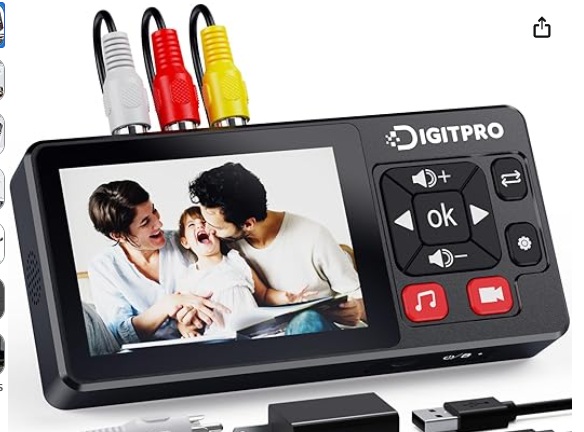
quality and what’s included with the device, and I ended up going for a $119 option
called DigitPro.
The DigitPro comes with a 3.5-Inch high definition LCD screen and built-in stereo
speakers that allow for real-time playback of recorded videos/audio without having to
rely on an external device such as a laptop or a television.
In addition to supporting transfer from VCRs, the DigitPro also works with DVD players,
Hi8 players, camcorders, and other players and camcorders. The best part about it? It’s
very easy to use, and comes with a very clear instruction manual. There are many
things you can do with it, but if all you want to do is transfer videos it’s amazingly easy
to do. Highly recommended.



No responses yet